
The Best Way to Build, Monetize, and Scale a Profitable AI SaaS
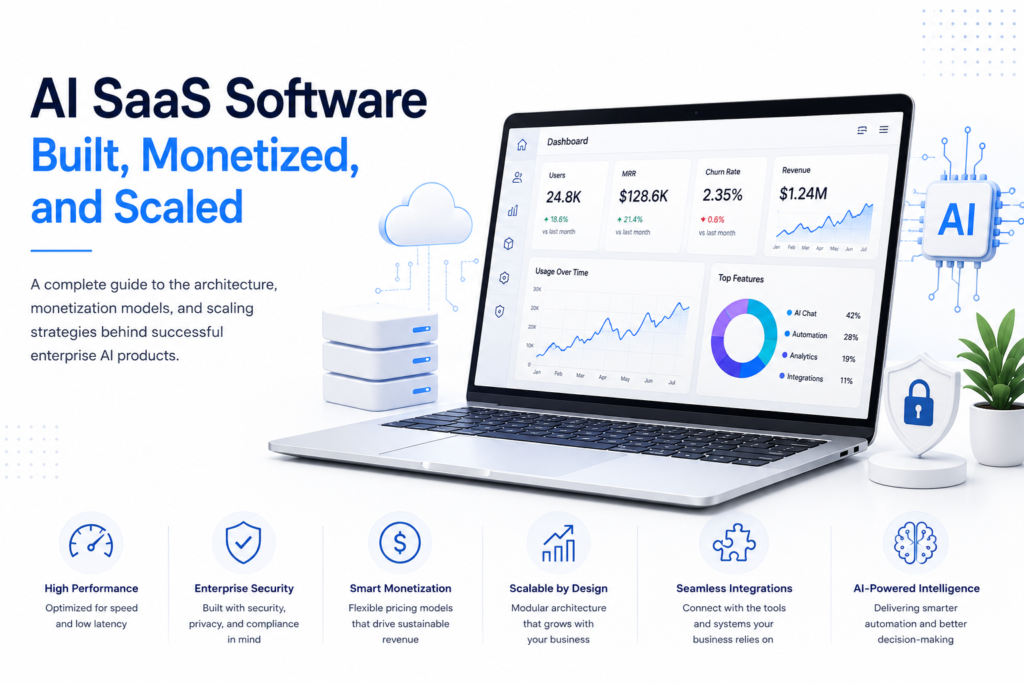
Building enterprise-grade AI SaaS means moving past the sea of simple wrappers. Real software for the workplace needs more than a clever prompt; it needs solid model orchestration, tight security, and infrastructure that won’t buckle under pressure. It’s about stability. Dev teams have to pick a pricing model that keeps the lights on without letting operating costs spiral out of control.
This guide breaks down the core architecture and pricing strategies that actually work. We look at the governance and scaling methods behind modern enterprise AI. Teams need to know how to handle LLM infrastructure while keeping performance high and inference costs low. But it’s a balance. You’re building a platform that can actually grow as the customers show up.
Key Takeaways
Architect for Performance and Cost: Design for speed and cost. Enterprise AI platforms use smart caching and retrieval-augmented generation to keep things moving. They rely on asynchronous processing and efficient model routing to sharpen performance. It works. These methods keep a lid on inference costs before they spiral.
Align Pricing with Consumption: Match your pricing to what people actually use. Hybrid models mix steady subscriptions with usage-based fees. This helps a business keep its recurring revenue predictable while still covering those shifting AI processing costs.
Build Governance into the Platform: Security has to be baked in. Companies buying these tools expect tight access controls and real privacy safeguards. They need to see a clear audit trail. So, the platform must have the right compliance guardrails from day one.
Scale with Modular Infrastructure: Scale through modular parts. It’s better to keep user-facing services separate from the AI inference itself. Background tasks need their own space, too. This split stops bottlenecks when the user count starts to climb.
1. System Architecture: How AI SaaS Software Is Built
Building a reliable AI SaaS platform usually means sticking to a modular design. Engineers have to figure out how to fold machine learning models right into the guts of a multi-tenant web system. It’s rarely a smooth process.
The system has to stay upright when an API hangs or a model times out for no reason. Data isolation is non-negotiable. You can’t have one customer seeing another’s private files. There’s also the constant headache of high traffic spikes and shifting server costs.
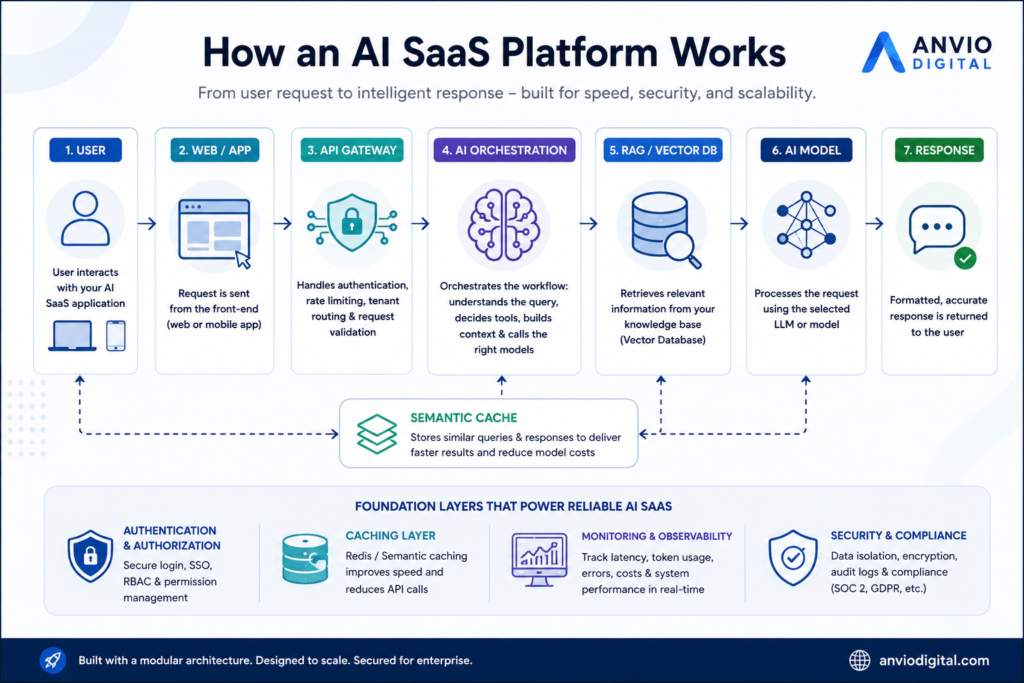
Core Architecture Components
API Gateway and Route Management
Everything starts at the API gateway. This serves as the front door, checking credentials and stopping bots before they swamp the backend. It handles the routing and makes sure each request goes to the right place. This layer keeps the internal infrastructure safe from the chaos of the open web.
An orchestration layer acts like a conductor for AI requests. It decides exactly how a prompt gets handled.
AI Orchestration Layer
Systems like LangChain or custom-built frameworks help apps pull together the right data. They grab bits of info, pick the tools needed, and call the model. Then they clean up the answer before you ever see it. Sometimes, the orchestrator realises a simple task doesn’t need a massive, expensive model. It swaps in a smaller one instead. It saves a lot of money.
But big companies need more than general knowledge. They need their own data. They can’t just trust a model’s basic training. That’s where vector databases come in to manage the context.
Context Management and Vector Databases
Retrieval-augmented generation, or RAG, connects AI models to a company’s own stash of approved info. It pulls from messy reality: internal policies, old PDFs, and product specs to keep things accurate. Vector tools like Pinecone or pgvector help out by finding the right data based on what a user actually means.
Semantic Caching
Sending the same question to a model over and over is slow and gets expensive fast. It’s like paying for the same meal twice. Tools like Redis store those frequent results. Smart caching systems detect when a new query is essentially the same as an old one, allowing them to reuse what they already know. This keeps everything snappy.
Caching works well when you set it up right. It cuts down on those redundant model calls and keeps response times snappy.
2. Monetization Models for Modern AI Platforms
Picking a smart monetisation model is the only way an AI SaaS survives. Costs don’t just stay flat; they spike every time a customer actually uses the tool.
AI apps aren’t like old-school software. They’re hungrier. Every time the model spits out a paragraph, burns through tokens, or scans a PDF, you’re paying for it. Even pulling data from an outside API or letting an automated workflow run in the background adds to the bill.
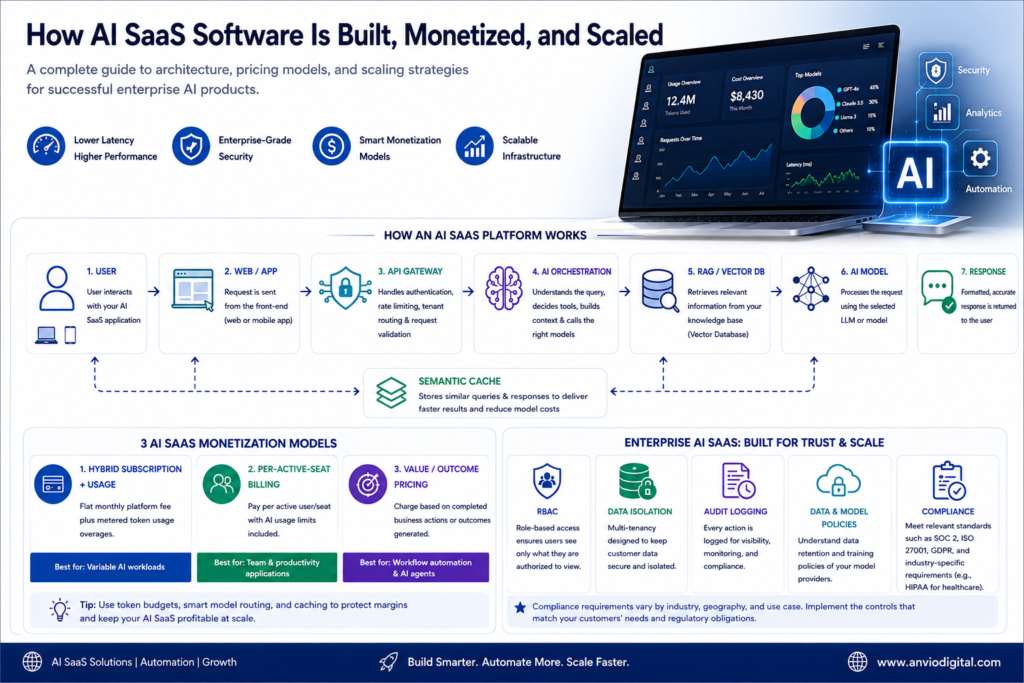
Hybrid Subscription + Usage
The user pays a steady monthly fee to keep the lights on. But if they go over their set limit, they pay extra for the overage.
This works best for big enterprise platforms where workloads jump up and down constantly.
This model gives the SaaS provider a steady stream of recurring revenue. It keeps margins safe even when a customer hits the AI hard.
Per-Active-Seat Billing
Companies pay for every employee or user who logs in. Most plans bundle in a set amount of AI usage per head. It’s a natural fit for team tools, internal apps, or big enterprise databases.
Value-Based Pricing
Instead of charging for access, the provider bills for a specific result. And it’s often more transparent for everyone involved. Think of a fee for every qualified lead or a set price for each document the AI finishes. These clear business wins are what trigger the invoice. It works.
Best suited for:
This tech works best for automation platforms and business agents. You want to use these tools where you can actually track the results.
Per-Active-Seat Billing
Protecting your margins is the real challenge. AI companies have to watch the gap between what a customer pays and what the servers cost. It’s a tightrope. One way to handle this is through usage budgets and smart routing. You send the small, boring tasks to a cheap model. But when things get heavy or require actual logic, you move them to the expensive one.
Other tricks include caching or cleaning up your prompts. Some teams set hard limits. Others stick to asynchronous processing. It’s all about watching every penny at the customer level.
The goal isn’t just to throw the most powerful model at every tiny problem. You’ve got to match the computing power to the actual job at hand. It’s about being smart with resources. That’s how you keep things running smoothly without letting the quality slip for the people actually using the tools.
3. Scaling AI SaaS Software for the Enterprise
Scaling an enterprise platform is about more than just buying bigger servers. Companies look at everything before they’ll trust a new system. They’ll dig into your security, your privacy setup, and how you manage who gets access to what. They want to see how data is handled and if there’s a clear audit trail. Then there’s the matter of how it fits with their old tech and if it meets legal rules.
Every industry is different. What a bank needs in London won’t be the same as a hospital in New York.
Essential Enterprise Governance Features
Role-Based Access Control (RBAC)
Role-based access controls let a company decide exactly who gets to see what. They’re the digital gatekeepers. These systems also handle what people can actually do once they’re logged in. An admin might have the keys to everything, while a regular staffer only sees their own tasks. This keeps the sensitive stuff like payroll or strategy locked away from teams that don’t need it. It’s about safety.
Data Isolation and Multi-Tenancy
Then there’s the issue of shared spaces. Most SaaS platforms are multi-tenant, meaning different companies live on the same servers. The setup has to be airtight. You can’t have one firm’s private data showing up in another’s search results or logs. It’s a mess if context leaks. Developers usually fix this through clever database design or entirely separate environments. Often, they use a mix of both to stay secure.
Comprehensive Audit Logging
Enterprise platforms keep a running tally of everything important that happens inside the system. They track when a user logs in, what they ask the model, and which files the system pulls to find an answer. These logs even catch administrative tweaks and the final text the AI spits out. It’s a lot of data. But organizations need these trails to look into security glitches or to keep the legal team happy during a compliance review.
Data Retention and Model-Provider Policies
AI SaaS companies have to get clear on how their providers actually handle customer data. They need to see where it sits and how long it stays there. Some big clients might demand specific contracts or technical locks to manage data retention. They often want a guarantee that their private info won’t be used to train the next version of the model. Every setup is different. The final deal depends on the provider’s rules, what the customer needs, and the messy web of privacy laws.
Compliance Depends on the Use Case
Compliance isn’t one-size-fits-all. No single badge or certificate covers every AI platform out there.
It’s messy because the rules shift depending on where you’re based or what industry you’re in. What matters most is who the customers are and the specific kind of data moving through the system. A company might lean on SOC 2 or ISO/IEC 27001 to keep things tight. But they also have to juggle GDPR or UK GDPR rules. And most of the time, their own internal security team has a list of demands, too.
Healthcare in the US is a different beast entirely. If a service touches patient data, HIPAA is always in the room. AI governance frameworks help teams spot and handle these risks before they break something. The NIST AI Risk Management Framework is a solid starting point for keeping those systems in check. Yet, every setup is unique.
4. Designing AI SaaS for Long-Term Scalability
Building a scalable AI platform shouldn’t mean stuffing every process into one tight, messy application. That’s a recipe for a crash. Instead, development teams ought to split major functions into separate services. It makes the whole system breathe better.
Think about the flow: a user hits the app, passes through the API and auth layers, hits the AI orchestration, and finally pulls from the database. It’s a chain. But long-running jobs like processing a thick stack of PDFs or running bulk data analysis belong in background task queues. So do automated workflows. These queues keep the UI snappy because users aren’t stuck staring at a loading spinner. They can keep working while the heavy lifting happens elsewhere. Monitoring is just as vital.
Teams have to keep a close watch on model latency and API failures. You’ve got to track how the infrastructure’s holding up and what customers are actually doing. It’s also vital to log inference costs and application errors as they happen. These numbers show you where the cracks are before a customer runs into a wall.
People Also Ask
What’s the best way to cut API inference costs for an AI SaaS?
There isn’t one perfect fix. Most people try semantic caching or model routing first. You could also tighten up your prompts or put hard caps on usage. Some teams find that batching requests works well. Others just swap in a smaller, cheaper model for the basic stuff that doesn’t need a massive brain.
Should enterprise AI platforms build their own models or stick to foundation APIs?
Most AI startups start by plugging into big foundation model APIs. They wrap these models in their own logic and unique workflows to make them actually useful. RAG systems usually come next to give the bot a memory. It’s a solid starting point.
But things get complicated when you need more control. You might reach for a custom or self-hosted model if the generic ones are too slow or just don’t get your specific industry. Sometimes it’s about keeping data locked down for privacy. And frankly, once you’re hitting huge scale, paying for API calls becomes a money pit.
Speed is the other headache. To stop users from staring at a blank screen, developers use tricks like response streaming or aggressive caching. They might also lean on asynchronous processing so the heavy lifting happens in the background. It’s about finding where the bottleneck lives.
What compliance rules do these enterprise tools actually need to follow?
There isn’t a single, universal gold star for every piece of enterprise AI software. It doesn’t work that way.
The rules shift depending on your industry, where you’re based, and what kind of data you’re actually touching. A company’s own internal buying policies can change the game, too. You have to think about privacy laws and security frameworks. And local rules or specific contracts matter just as much.
If you’re handling personal info, GDPR is going to come up. But for a healthcare firm in the States, HIPAA is the bigger hurdle. It’s a lot to manage.
Conclusion
Building and selling AI software is a balancing act. You need technical speed, but you also need to keep the lights on and the data safe.
A solid platform needs modular guts and smart model orchestration. It depends on quick retrieval systems and clever caching to keep things snappy. The design has to include strict cost controls and a pricing model that actually fits how customers use the tool.
But winning in the enterprise world takes more than just being tech-heavy.
Companies need to trust how a platform treats their data. They want a system that won’t fall apart the moment everyone starts using it at once.
AI software firms will finally stop being experimental toys and become real business tools once they pair helpful automation with tight data rules. These leaders will offer clear pricing and systems that grow easily. And of course, everything has to plug into the rest of the business without a fight.